
Keyboard
A programmable keyboard extension built on Vial-QMK
Overview
Comet Keyboard is a custom programmable keyboard designed for power users, developers, and serial texters likewise.
It is built on Vial-QMK, enabling real-time remapping while also supporting advanced firmware-level behaviors that go beyond standard QMK features, and includes an integrated touchpad for pointer input and navigation.
The design emphasizes ergonomic efficiency and minimal finger travel, with an architecture optimized for symbol-heavy workflows, intuitive layer usage, and clear visual feedback. By combining real-time GUI remapping, the extension delivers both flexibility and predictability without sacrificing comfort.
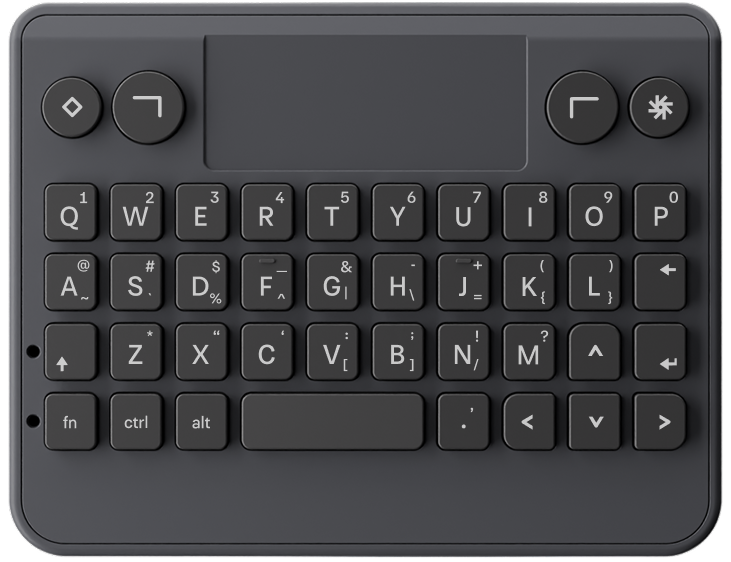
Hardware Specifications
- MCU: STM32G431CBU6
- Firmware: Vial-QMK
- Trackpad IC: Azoteq IQS 9150
- Keys:
- LED Indicators:
- Caps Lock LED
- Fn Layer LED
Firmware Architecture
The firmware is built on Vial-QMK, that extends QMK with a secure, persistent configuration interface, allowing keyboards to be remapped in real time. It combines the robustness and flexibility of QMK’s firmware architecture with a lightweight GUI that communicates directly with the keyboard over USB. Allowing modifications in real-time. It also provides:
- USB HID compliance
- Real-time key remapping via Vial GUI
- Persistent configuration storage
- Standard QMK hooks
Keymapping and Layer Design
The keyboard uses three primary layers:
Base Layer (Layer 0)
- Standard alphanumeric input
- Custom Caps / Fn / Space behavior
- Navigation keys
- Mouse buttons
Fn Sticky Layer (Layer 1)
- Activated via Fn tap
- One-shot (auto-clears after a keypress)
- Contains symbols and navigation shortcuts
| @ | # | $ | _ | & | - | + | ( | ) |
Fn Hold Layer (Layer 2)
- Activated via Fn hold
- Active only while Fn is physically held
- Function keys and extended symbols
| ~ | ' | % | ^ | | | \ | = | { | } |
Custom Key Behaviors
Caps Key (CAPS_SFT)
Caps behaves as a dual-function key:
- Hold → Left Shift
- Double Tap → Caps Lock toggle
Fn Key (FN_KEY)
Fn is implemented as a layer key with sticky support:
| Action | Result |
|---|---|
| Tap | Sticky Layer 1 |
| Hold | Momentary Layer 2 |
| Release after use | Sticky cleared |
Space Key (KC_SPC)
Space has a smart punctuation feature:
- Single Tap → Space
- Double Tap →
.(period + space)
Vial Integration
The firmware is compiled with Vial enabled, allowing:
- Live remapping
- Layer visualization
- Persistent configuration storage
You can download and install Vial from the homepage and follow their guide here to better customize your keyboard.
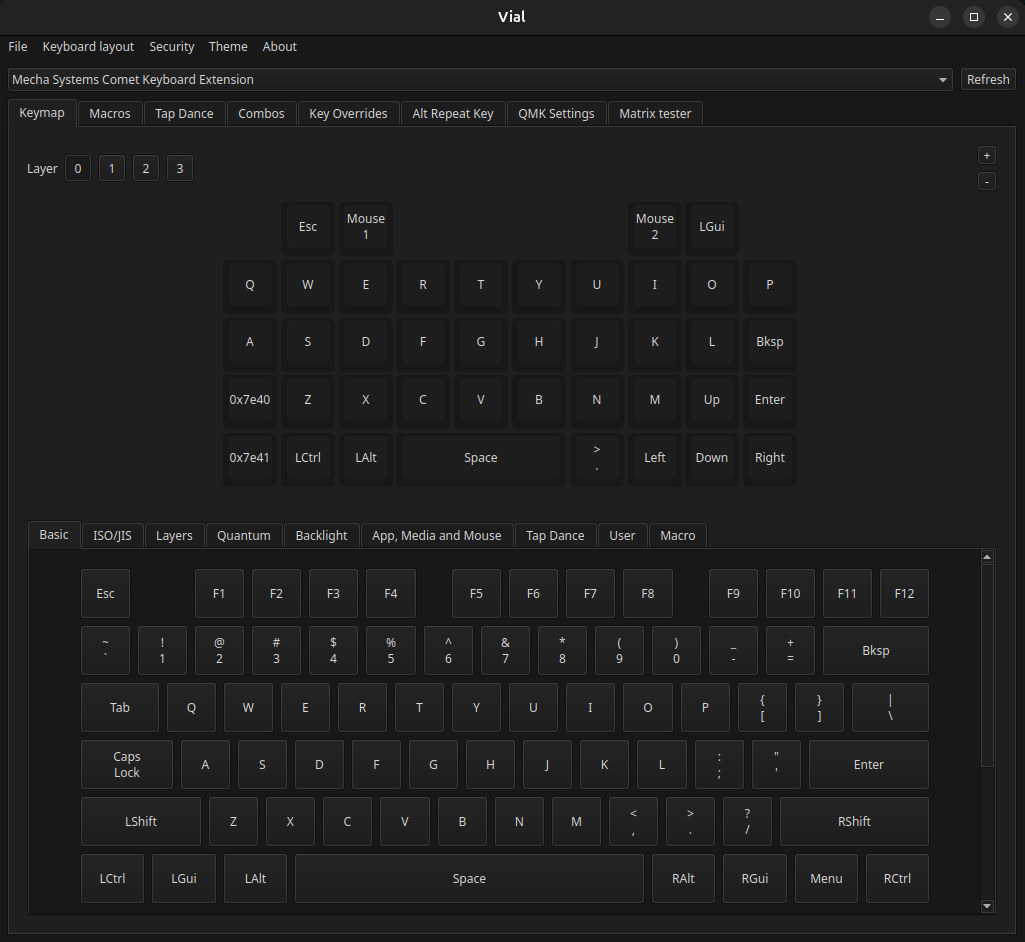
Remapping Guide
What You Can Do With Vial
-
Remap normal keys on any layer
-
Have your own custom macros and key-combos
-
Rearrange keys to match your preferred keyboard layout (QWERTY, Dvorak, custom, etc.)
Default Combo Cheatsheet
| Physical Key / Action | Mapped To |
|---|---|
| Action L1 | Escape |
| Action L2 | Mouse Left Click |
| Action R2 | Mouse Right Click |
| Action R1 | Super / Windows Key |
| Shift | Double Tap → Caps Lock Single Tap → Sticky / Combine |
| Fn | Double Tap → Latch Fn Key Single Tap → Sticky / Combine |
| Q-P | Example: Default → qShift + Q → QFn + Q → 1Super + Q → F1 |
| A-L | Example: Default → aShift + A → AFn + A → @Hold Fn + A → ~ |
| Fn + Backspace | Delete |
| Arrow Keys | Up, Down, Left, Right |
| Space Bar | Single Tap → Space Double Tap → . + Space |
| Tab | Fn + Arrow Right → Tab Fn + Arrow Left → Back Tab |